Way Too Early 2: Bridging the Gaps in the ICT Accessibility Lifecycle – Pre-Publication Content Quality Assurance
Watch the Webinar
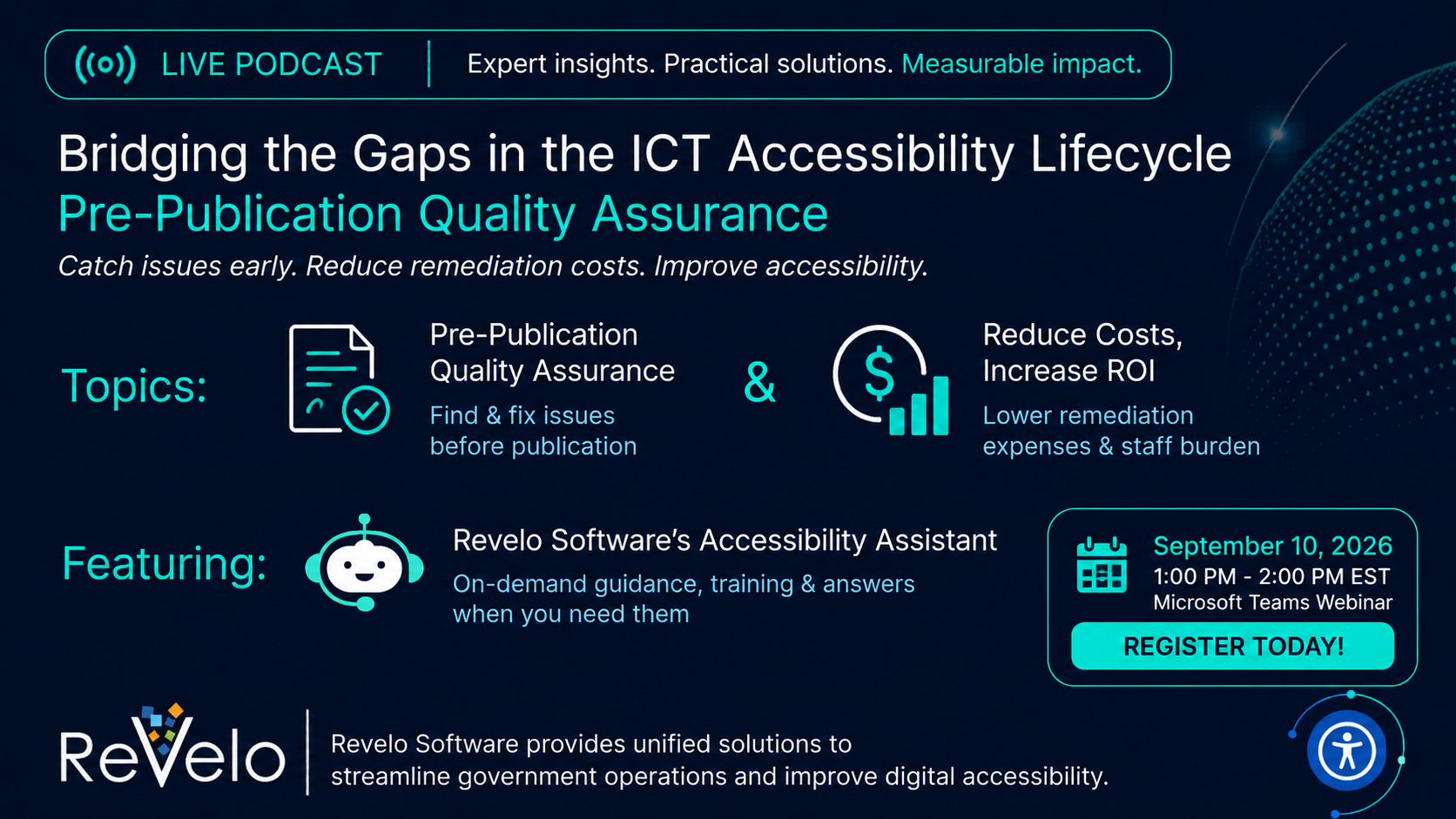
Remediation earlier in the accessibility web and document content publication lifecycle saves time, enforces training, and reduces costs. Through proactive measures, agencies build accessibility into everyday content workflows.
During the session, we will cover:
Pre-publication accessibility and content quality checks
On-demand accessibility guidance and training
Accessibility Conformance Report (ACR) evaluation
Connections across quality assurance, remediation, monitoring, and reporting
Read the Webinar Transcript
Arnetta LaMae
Yes, and it's right at 1300. So I'm going to go ahead and get started. And Jasmine, please continue to allow attendees to join us for this Way Too Early 2 session today. This is our September Way Too Early 2 session on bridging the gap and the ICT accessibility lifecycle. And we're going to be talking today about pre-publication content assurance and moving from activity metrics to outcome metrics. And this is one of the areas that OMB recommends. So today's meeting logistics, let's go over that just a little bit here. Participants will be muted during the presentation. We will unmute participants. If you feel free, if you want to ask a question during the presentation, just raise your hand and we'll unmute you. Otherwise, you'd be muted. and then you will definitely be unmuted during the Q&A session. The links to this presentation is being recorded with closed captioning and transcripts will be available and distributed via e-mail. And again, during our Q&A session, I encourage you, I want you to feel relaxed, and ask questions. And, you know, if you don't want to ask it out, just put it in the chat and we have someone monitoring the chat that will make sure your questions been addressed. So again, welcome. I am so excited. I love these way too early sessions. And again, you may be asking, why is it, why am I calling it way too early when it's, you know, actually in the afternoon or it's 1300? And I originally started these way to early sessions as a way to bring all of our 508 program managers together and give them a safe space to ask questions and address issues that they're having with making sure they're compliant to standards. So That's still the tone of this way too early podcast with a little more flavor to it, because now I've teamed up with Revelo Software and the Optimal Solutions Group team, and so we can actually give you tools to help you get to where you need to be in your 508 program management world. So we're going to be talking about the accessibility Maturity Model. Tracye Turner is going to give you a quick overview on that. And then we're going to have we'll have a Q&A session at 1330. And so, you know, write your questions down and make sure you ask them when that time come or put them in the chat. And then we'll have some closing remarks where we'll allow different team members to give their remarks. And then we're looking at November 5th for our next podcast. So with that being said, I am going again, welcome you and now turn the mic over to Miss Tracye Turner.
Tracye Turner
Thank you, Arnetta. Pleasure to be here with you again. Yeah, I just want to kind of go over the accessibility Maturity Model. This is from the World Wide Web Consortium. We put the link at the top of the slide just so everyone can have time to copy it down. We'll drop it into the chat. There are plenty of spreadsheets and guidance and contextual information, but really at a high level, I think most of the agencies, and we have been talking with folks and reading the 2025 GSA Section 508 assessment, most agencies have launched. Many are into the integrate stage, and we're all aiming to be in the optimize stage because that's where we start to see that outcome improvement. And so if you're somewhere anywhere along the spectrum of this journey, I think there's something in today's webinar for you. So we're going to go to the next slide. So we want to definitely align with what GSA recommends. And so they're starting to see that the agencies have annual training, they have policies in place, and what GSA is saying, well, we need to focus more on outcomes now. We've set the baseline and we're building up, but we need to get to that remediation and conformance levels that we have set out as goals. and so they gave out some recommendations. And again, we all just work through the 2026 report, and so we're not going to see the results for them. So we're still working through the 2025 recommendations. But, you know, working through the CIO's office, embedding assessment or accessibility into the risk management frameworks like you have for cybersecurity and the other parts of your risk, making sure that acquisition as a lever, whether you're buying through a single agency portfolio or using it up front to assess your ICT, governance, training, and then they said prioritization. There's such a huge inventory out there. So helping the agencies work through their top visit websites and getting those done and then working their way out as that training and knowledge starts to build for new content going out on your web and ICT. So on our next slide, What we want to focus on in today's webinar is just really what is that ecosystem of all the tools and procedures and policies, how do you embed them into your operations? And that's when you get into that continuous integration and continuous delivery pipeline. That's that optimization. at that maturity level. And so while we may have monitoring tools for your web, like in the middle column, and you're doing your testing, and manual testing is still an area that many of us have not gotten to yet because we're still getting through the automated testing. and then looking at your document inventory. So now we know how many documents we have, and we know what types of errors or barriers are occurring, but how do we remediate them in affordable ways? And so we've talked about those two topics in previous webinars, but today we're going to focus on the far left. How do we get ahead of all of this so we're not fixing things after they're already out there? And so in our previous webinar, we covered our accessibility Conformance Report Evaluator tool, and we talked about our on-demand training and real-time guidance. And today we're going to talk about our latest tool, which you can use your Microsoft tools, your Word accessibility Checker. There are tools out there besides ours. But leveraging them, how to get your teams to leverage those tools as they're developing content. I work with a lot of researchers. They put together a lot of statistical tables and infographics and visualizations. And so I know those challenges of when they're trying to create and develop complex content and still try to get them to incorporate accessibility as they go along. So we're going to talk a lot about that today and show you some really feasible ways to make sure that you can cut costs, save time, and meet your goals sooner, not just your top visited sites, but continuous integration, continuous delivery over time. Next slide. So, Arnetta, you know, one of the things that this was your idea, you said, you know, there's a lot of activity and now we need to look at outcomes. Can you talk about that a little bit?
Arnetta LaMae
Yeah, so when I reviewed the OMB, GSA OMB report, you know, one of the areas that they, you know, they highlighted and said that they were not getting good feedback on the results or the tests, and it was pretty obvious reading through the report that, you know, a lot of people are falling, agencies are falling short on testing. So some of the questions you need to ask yourself are, are you asked about your testing coverage? Do you have the right types of people on board or in staff? to test your websites and your documents. Are they trusted testers or certified testers? And we know the trusted testers are recommended. And so if you don't have any trusted testers, I would highly recommend you, you know, look at, you know, sending someone to the trusted tester training and having them certified. And you want to make sure your ICT, you have IC inventory coverage. You want to make sure you have those those baseline reports that show exactly how much ICT you have. what needs to be tested and why, you know, haven't been tested or, you know, where you should be focusing. And you want to make sure you have document coverage too. You have a lot of PDFs and Word documents and spreadsheets and, you know, all types of documents out there. So you want to identify those and make sure they're covered. and definitely cover your mission critical systems. And so these are areas that we can help you. We can help make sure, you know, we identify the level of coverage you have and whether or not you need to, you know, you know, bump that up or not. And then are we finding and fixing the right issues? And you may be finding the issues, but then are you fixing those issues? And again, this is where our team can help you. You know, we can help you identify those critical high severity areas. We can help you with, you know, any pre-asset access defects. And then you want to make sure you focus on your retest pass rate. You know, if you've tested and your your system or your software or your website didn't pass, then, you know, we can help you identify why it didn't pass. You know, we can we can drill right down into those areas and your request pressure rates. So I want you to into the 508 program, I want you to keep the test and our requirements and questions, there's a full section on testing on that OMB report. I want to make sure you focus in on that, and then, you know, just reach out to us and let us know that you need help in this area, and then we can make it easy for you. You know, we can make it easier to get through those questions on that OMB report. Tracye, you have anything to add?
Tracye Turner
Oops, excuse me. You're talking about activities and so, you know, moving towards those outcomes and, and, you know, testing is a big part of getting to those outcomes. And then, like you said, getting to those critical high severity findings, it could be that people are having challenges with fixing those things. So we This is where I think we'd like to talk about how we can help with giving you real-time guidance to push through those.
Arnetta LaMae
Thank you. And then are we resolving issues on time? And I know this is another question that's on your OMB report. And you know, what's the average remediation time? Are you spending a day or two days or a week or a month? You know, we can help in this area. Are we, are you testing aging equipment or, you know, systems that are aging out and I, and I know that I think that maybe is going through where they are looking at all the aging mission critical systems and you know, ruling those out. but you need to have a good handle on, you know, your agent equipment at your at your agency and remediation completion rate. That's another question on the OMB report, and you want to make sure, you know, you properly address that. And then are users experiencing fewer barriers? You know, are we reducing the reoccurring defects? You know, and just because you look at a software Word Document or PDF or website today, You know, a lot of documents I know, especially the ones that are produced by EEO and your public affairs office, you know, they are dynamic. So it may test fine today, or it may have issues that you need to fix, and then tomorrow, there's changes or an update. And so you need to make sure If if there's any reoccurring defects, you need to address those in real time as well, and you and this will help improve your conformance rate. And are you you most you know agencies and vendors that are trying to conform to the 508 standards, but you need to have a way to say, yes, you know, we're conforming because I have a report right here that was generated by Optimal Solutions Group that shows me my performance rate. And then reduced accessibility complaints. And you may or may not have a lot to do with this. I know when I worked for the Navy, I worked directly with EEO and public affairs and the RA program, and that's where the complaints are funneled through. And so most of agencies complaints go through the reasonable accommodations program. And you may have a lot of complaints that come in that you address, you can address in real time, and we can help you in this area as well. But if you have complaints out there that are not being addressed, then that's where lawsuits come in and the lawsuits are real. And so we don't want you to get to the point where, you know, someone's filed a lawsuit because they can't access your documents or they can't get to your web page. And then improve the access to mission critical services. This is critical. because, and I do remember I used to get a complaint where there would be mandatory, you know, training put out on a mission critical system, but our people with disabilities could not take the training. And so I had to make sure we could address that in real time. and this is another area we can help you overcome if you need our help. Okay, Tracye, you have anything to add?
Tracye Turner
Yes, thanks, Ornetta. Yeah, I think, you know, one of the things I want to point out is, yes, you've done your testing, but what if it was three years ago? And then did you have a plan of action? Did you take action? And that gets into that average remediation time. And so what we're trying to do is we're just trying to keep all of that from going out there from having to track how long it's been out there and did you find it and did you fix it. And that'll save everyone a lot of time. So yes, we're going to move on to the next slide and just say, you know, when we're looking at pre-publication quality assurance, we're talking about not just your web content, but your documents, getting test results right away,
Arnetta LaMae
Mhm.
Tracye Turner
getting guidance, whether it's you need high level guidance or really detailed guidance and or providing access to open source resources to help you do that testing and remediation. And then the next slide, we're going to talk a little bit more about Okay, so now I have this problem and I need to fix it. And so am I using standards based sources to provide guidance to me? Because you can always ask ChatGPT or Google it, but you might get a different answer and have to search through the ads and all the other things to. to get the answers. And then also, do I just need more training? Because everyone gets their annual training, but it's really difficult to recall. So getting that on-demand training, on-demand answers actually reinforces over time. And then sometimes you just have the same question over and over. That happens to me a lot. We can save your previous queries and answers for you to refer to on our accessibility Assistant. Next slide. So the other tool that we've talked about quite a bit in our last webinar, I won't spend a lot of time on it, is that ACR Evaluator. I'm starting to hear more discussions about procurement is the front first line of defense when you're buying ICT from vendors or you're developing it. And I think Mark's dropped a link in there, but are the ACRs aging? Was there any improvement from the vendor? And and so having that that centralized repository that GSA is just put up is really helpful, sharing those resources, but are they improving and do we have time to read and understand them? So that's where that's helpful. All right, next slide. So we're not going to spend a lot of time here, but this is an example of a dashboard where you're getting your web health stats, whether or not it's your number of web pages not accessible, what percentage are not accessible, how many are recurring, and, and, but, you know, how many types of accessibility errors do I have, how many violations, but then were they happening? And then also the PDFs, that's the big inventory everyone's trying to grapple with. And on the next slide, we had gone over this in the past, but there are AI options, as we've talked about with the E508 platform. Next slide. And so With E-508, you can get not only how much it costs and the standards that your agency is using, but then AI options. So a lot of times you can't use AI. You need human review. And if you use AI, you may need human review with the AI. You don't want to have to run through a whole lot of emails. and different vendors, you can do it all here. So that's it for the commercial. Next slide. We're going to go into a poll and you don't have to participate because I know everything's kind of private within the agencies, but just something to think about. the low hanging fruit. Do you know your top visited websites? And so, you know, yes, no, maybe. And then, By now, everyone should know you've talked to your web administrator, someone who handles your Google Analytics, and they're telling you, well, this is where they're going, this is how long they're staying, this is how many times they clicked, whether or not they received any errors on the page, inactive hyperlinks, you know, do you have that information? Is important, and so the next. Next question. Now, assuming you know... your top visited site. We'll go to the next one. Do you know the top 10 pages? That's, again, the low-hanging fruit. What kind of barriers? Which office is it coming from? When's the last time it was modified, that document or that web page? You know, do you have that basic information so that when you're pulling your sample for your GSA report. And most agencies know, and they have a huge inventory beyond the top 10 websites. But it's a good place to start for low hanging fruit, because oftentimes you'll have the same 5 or 10 top recurring errors. And so then the last part of the question is, if Jasmine, you could close that poll, Um... Do you have an action plan? And if you have an action plan, which many of us, all of us do, what's the barrier? Is it the resources? Is it the funding? Is it not having a contract in place or the expertise? And so those are the types of things that There we go. So most of us know our top visited websites, and again, your Google Analytics can give you that information, and we can help you develop a plan for those top websites.
Arnetta LaMae
And then just keep in mind, you know, right now GSA and OMB, they're just asking you to report out your top 10 websites, so your top 10 videos, or your top, you know, are they iAccessible? And they,
Tracye Turner
All right.
Arnetta LaMae
only made that decision to do that about three or four years ago because they were they were running into problems or issues with people reporting out on everything at one time. And so they're not at saying that you don't have to report. everything that you have, but right for time being, and I don't know for how much longer, they will just allow you to report those top 10 websites and videos. So you want to be in a position where you have a full inventory. and you can report out on everything that you have at your site. Because I think I have not heard this, you know, so don't quote me on it, but I think it's coming in the future where they will be saying, we're no longer just accepting the top 10. We want the poor report.
Tracye Turner
Absolutely, and we can help with that, you know, get that baseline to inventory, because you want to know how many web pages you have because you have, you know, the ability to archive some portions of it and then reduce duplicate pages. It all improves that experience for your users and it and reduces the level of effort on accessibility remediation. So now we're going to go, Arnette, if you don't mind, we're going to switch over and just start showing a few solutions for a few minutes. We're not going to spend a lot of time on it because we'd like to engage our attendees today on any questions they might have. So We're gonna have a profit mesh.
Arnetta LaMae
Yeah, but real quick, let's can we view the poll and see what the answers are?
Tracye Turner
Oh, oh, yes, I thought they'd come up on your screen. I'm sorry, I've seen them on my screen, but two-thirds of users know their top sites, and one-third do not. And so, so they're, you know, they're everyone's in that different level of...
Arnetta LaMae
Okay.
Tracye Turner
accessibility and maturity in their life cycle, which is great because we can help everyone along their journey, whether they're just starting. But that is a really good first step, knowing your entire inventory and then figuring out your top visit websites.
Arnetta LaMae
Okay, all right, good. Thank you.
Tracye Turner
Sorry about that. I'm sorry. I thought you saw that. All right, so we're going to move over. Prathamesh is going to share his screen and we're going to go to the accessibility Conformance Engine. And what you're going to see is 3 products here within our conformance engine. One is called the Content Assurance Pre-Publication accessibility and Conformance Dashboard, actually. And to the right of that orange button on the upper right-hand corner, that's the ACR evaluator. We've already done that in our last webinar, and today we'll focus on this. So right here, you're the dashboard. And this is a view from someone who has loaded several documents or an administrator where people have users have gone in and they've uploaded these documents and or web content to see what's going on in terms of errors. Now, barriers. Now, this could be for accessibility, this could be your PII detection, this could be for style writing guidelines. That's why we just didn't call it accessibility. It's pre-publication accessibility and conformance for whatever the rules or protocols that you're trying to make sure that your documents have. For right now, we're focusing in on accessibility. Now, you can see who the creators are, what their status is by creator, when they started and ended. Now, there you go with the status and the start date and the end date. So what we're going to do is we're going to upload, and the assets are really the document or the web pages that you've uploaded. So, this is a bird's eye view of what's going on across your documents, because this is where you can start to detect trends. So, if you were using the Microsoft Word accessibility Assistant, you may not be able to gather the trends across your documents, which can show you where your users need training. or on-demand assistance. So we're going to upload a document. And we're going to show you pretty much in 20 seconds, we're going to apply the rule sets, we're going to do the validation, we're going to look for structure and readability. Again, this could be a number of rule sets that you're applying right now. We're looking at accessibility and readability, and we're generating a report. You're going to get a summary. at the very top bar, your overall score, critical, serious, moderate findings, a narrative under the POUR: perceivable, operable, understandable, and robust. And then you can open up your report and get some more details on What exactly are the barriers? And when you click on the barrier, you'll have your document to the right. It's going to give you some details, what it is and how to fix it, and also some findings and some code on how you can actually make the adjustments. So if you look at the fixed strategy and the detailed finding, This is a high level window. There's only so much we can get into this interface. But what we also have is the accessibility Assistant. So if you need to go deeper into what this barrier is, what's a quick fix, what's a more robust fix, getting the sources of where the fixes are, we open up the accessibility Assistant. And we can make this a little bit more seamless right now. It's a separate module. And we cut and paste it in here. And this is where you can get a lot more details about how to fix things. And query, and it'll interact with you. So you're like. talking to a person and to get the answers. So we're going to enter this in. It's thinking right now, and it's going to give us a pretty robust answer, and then it's going to cite its sources. And here we go. So it's going to give you some details, how to remediate. robust fix, how do you test, and what the references are to fix the problem, and how you test and validate what you fixed. So over time, your team is going to be learning because they're getting these answers in a short format, and then they have an option to dig in. But let's just say, It just seems like, you know, I just need training. So we can go to the training tab here, and that's where you can type in the type of training you want, and you have it in multi-mode. You can get a video, a PDF, web article, YouTube video, handouts, audio, different modes of training, resources to go deeper into that question. So as you can see, there's just like a very comprehensive approach. So this is part of that continuous integration, continuous delivery at every level that you're producing content. So before you put it out there, even after you put it out there, getting short answers, the longer version and training if needed. All of these are open source training and all the sources for that training is listed there. So you don't have to guess, you know, where this data is coming from. So we're going to go back to the application and I just want to pause because we've gone over quite a bit. Arnetta, any thoughts or questions that you might have?
Arnetta LaMae
Yes, let me see if I get, let me get my thoughts together. So this tool, this tool will help you identify, say like in a PDF or Word document, you can run it through this tool and it'll help you identify the issues with the document, correct?
Tracye Turner
Yes, what, what the issue is?
Arnetta LaMae
Okay, and so, and how to fix it. So do you have a service that will help fix the issues that's found? Because I think that relates to how long does it take you to remediate?
Tracye Turner
So there are two ways. What we're trying to do is build institutional capacity or organizational capacity for the agencies. We can fix it. You know, we can use AI and we can fix the documents. We have human remediators. But what we're trying to help them do is not have to keep hiring a lot of contractors to fix these things. We want their teams, maybe not become experts, but certain teams develop certain types of content over and over. And so we're thinking that this is going to reinforce their learning on how to fix the types of things that they're encountering. They may not fix everything, but it'll reduce the remediation load downstream. Now it looks like Angela, I think Watkins has a question. Angela, let's see here. Can you, is she, are you unmuted? Maybe you can, let's see, did she Chat the question? Let's see.
Jasmine Grant
You should be able to unmute now.
Tracye Turner
Thanks, Jasmine.
Jasmine Grant
Swatkins.
Tracye Turner
Looks like she still can't see anything. Well, Angela, if you can, she's unable to unmute.
Arnetta LaMae
Huh?
Tracye Turner
But Angela, if you can chat us your question, we'll be sure to answer it. Oh, Q and A. All right. So let's see. Jasmine, do you see the Q&A hub?
Jasmine Grant
Yes. So the question is, who's the audience for the tool, experienced or non-experienced users? Some of the feedback is good, but it may be overwhelming to a new user.
Tracye Turner
Very good question. And so one of the things I'd like to point out right away is the accessibility Assistant is made to answer questions from a person who's a novice, may not even know how to form the question. So that's one way that you can make sure that various levels of users can get the answers that they need.
Mark Turner
Tracye, yeah.
Tracye Turner
Yes, yes.
Mark Turner
Can I add to that? Yeah, we're continuously improving this tool, so we're making it where the responses are more tailored toward the person's role, whether they're web content or, you know, Document, as well as their level of competency, either. from an accessibility perspective, a beginner, intermediate, or expert. So we're refining it so that it provides responses that are aligned with that level of competency and or familiarity.
Tracye Turner
So for forms, that's a really good question. Yes. So for forms, you know, one of the things that we work with is a service called accessibility on Demand. It's an AI service to help with fillable forms. We just attended their webinar yesterday. We find them to be
Arnetta LaMae
Yeah.
Tracye Turner
one of the best options for AI remediation. They are just now releasing fillable forms in terms of AI remediation. It looks like it's going to be another, they say one to two weeks. I'd give it a month before that release comes out. Now, Can we provide guidance on fillable forms in the accessibility Assistant? Yes, we can. And so I'm not as sure about whether or not this tool will provide guidance on fillable forms to the degree you need it. So What we can do is, let's see, does, let's see, Luis or anyone, do you have a fillable form we can upload just to see what the results are? So fillable forms are the last frontier for the AI and automated tools. The training answers are really good on fillable forms. I just want to put that out there. But in terms of this tool detecting and giving advice, I'm not 100% sure. So we're going to have our team look up a fillable form and see if we can upload one and see what kind of response we get. And Prathamesh and Lesh, you know differently. dynamic forms. Yeah, that's going to be a trickier one, but let's see what we have here.
Prathamesh Sharma
Was there a file sent in the chat? Actually, I just have one vendor so I cannot see.
Tracye Turner
Luis, if you could send us a fillable form, maybe one we just completed or something like that. Luis Velarde And these two, let me search for a favorable format. I didn't search for a house.
Tracye Turner
So we're going to give it a shot, but as I mentioned, I know the accessibility Assistant can answer the questions and it's just really tougher for the automated tools to work with fillable forms, in particular, the dynamic ones. So I'd be interested to see, you know, how well it does. It'll vary. We had a fillable form assignment recently that was 20 merged scanned documents that were fillable forms. So I don't think it would perform well on that. There's just all these variations on fillable forms. So while they're doing that, I would like to, for Prathamesh to go back, yes, we'll follow up, to the original dashboard and we just want to show that you can also upload the web pages as well. So if you have a URL that you want to enter, Right now in the news, we all heard about the new iPhone that's come out. So we'll pick on Apple today. And we're doing one page at a time. It's going to scan that one page, apply those rule sets, and then generate a report for us. And so again, we're talking about pages. and we're talking about documents and we're talking about web pages in terms of what you can scan here. And so we're going to get the same type of report as we mentioned before with the score, the critical findings, serious findings, and then go into the detailed report, same as the documents. and get the types of barriers and how you fix them, what they mean. And then if you need more guidance, you can get the training and or more detailed responses from the accessibility Assistant. So I think, oh, yes, yes.
Arnetta LaMae
So, I have a question. So, I know that, you know, like Microsoft and you hit on that a little bit, have an accessibility checker and a lot of the other software programs have accessibility checkers embedded as well, and then you probably have some free open source. you know, checkers out there as well. What's the difference in your accessibility Checker and say, if I want to use Microsoft or one that's embedded in, you know, another software product? I can't hear you.
Tracye Turner
Yes, excellent question. Prathamesh goes back to the main dashboard. What you're going to see is if you're using the Microsoft tool, you're going to get feedback on your individual form. But here you have a dashboard to look at your metrics across your enterprise. These are all big agencies. you know, you have a department, one 508 administrator has a lot of documents, you're going to start to see how many open critical issues you have across all of your documents, because sometimes you're trying to remediate several at a time. And that's when you can kind of say, oh, I have this error across 200 documents, I need training, I need to know how to fix these. But you start to see improvement over time with your documents and then also that you get a better idea of not just an individual's one document, but what's going across all the documents that you're you're remediating.
Arnetta LaMae
Okay, so yeah, thank you, but I had just one other question. So, you know, we have to conform to the Access Board standards. Are your checker pulling from those standards, or hitting against those standards, so we know that, you know, this is not just an engine out there?
Tracye Turner
And those training resources are.
Arnetta LaMae
It's giving us feedback on standards that we we don't have to conform to.
Tracye Turner
Absolutely. So the standards that we're using are multiple. So it's actually a little bit more rigorous in terms of we're using PDF/UA, we're using WCAG and ISO standards. So one may find a barrier, one may not. But with the combination of all three that you have assured to have multiple standards applied by all the accepted organizations and accessibility.
Arnetta LaMae
Including the access for standards. Correct.
Tracye Turner
Yes, because the Access Board uses those standards, yes.
Arnetta LaMae
Very good. And then if you can't really, once you receive the report and you don't understand or you have questions, then that's where you can go to the top to box. Am I saying it right?
Tracye Turner
So, when you get the test results and the detailed report, they align with poor, you know, which we had just gone over, and it tells you what each standard meets. So, if Prathamesh goes to the report, the summary. It tells you what the standards mean broadly and why they're important and where you stand with those standards. That's a high level understanding and what your score is. But then when you go into the detailed analysis, that's where you're going to get it broken out by the types of barrier and why each one is important, because each barrier has a different significance in terms of why it needs to be fixed and what the understanding is of why it needs to be remediated. So you get a high level, mid-level, detailed, and then you can go over to your accessibility assistant and get more answers and more training if needed. And over time, you have this continuous loop of improvement. And then you're starting to get content out there that's accessible and not just put out there and then fixed later on. And you have the aging report and how long has it been out there and are we doing our top 10 pages? It just starts to be part of your culture and environment, which is that optimization level and the accessibility Maturity Model that we started with with the World Wide Web Consortium. It's kind of like how we have to do software and in software terms, it's called technical debt. And so you want to reduce your technical debt by incorporating it in your operations as you're developing. Yes.
Arnetta LaMae
Absolutely. And if you get started now, you'll be well prepared by the time you have to respond to the next OMB report.
Tracye Turner
Absolutely. Your team is trained. We can, again, help you if you have, if you don't know your inventory, find your inventory, find your top 10 sites, remediate them, but then where is it coming from? Who needs training? Who needs the resources to learn? before it gets put out there. And so what we're going to do is switch back to our last slide. And so we have a landing page for everyone to go to. I just want to say that, again, the ACR evaluator is up and ready for use, free trial. The accessibility Assistant is up and ready, free trial. iAccessible agencies have been using it for years. But the accessibility Conformance Engine, we're in a pre-order phase. It's coming out October 1. As you could see, the only few things we're missing, and it is the downloadable report, which all of our products have. We just have to add that in there, do a little bit more testing. but at the bottom of the slide, there's the website. We can drop it into the link for you to copy. I know sometimes it's not advisable agencies scan QR codes. So that is a trustworthy one, but we do have the website address at the bottom. It's a landing page with all the products. And again, if you're interested in the pre-publication content review, then we definitely will sign you up for our October 1st release. And I just want to see if there are any more questions. Oh, and yes, today I just want to point out that Optimal Solutions Group is one of our core resellers and service providers, and we were just picked up by Carahsoft, and they are on NASA SEWP, they're on GSA, they have a lot of government DOD projects or contracts as well. And the big question always comes up, and I want to bring it up, which is FedRAMP. So iAccessible is a Revelo software product. We have had several agency ATOs. Now we're going for FedRAMP 20X this fall, and so we will be getting that. In my cybersecurity training that I do with the agencies, Sometimes agencies have waivers if you're scanning publicly available information using general LLMs, and so that is something that each agency has to make a decision on in terms of using generative AI LLMs.
Arnetta LaMae
Yeah.
Tracye Turner
So iAccessible is not an AI product. E508 has AI options, but it's not an AI product. But the pre-publication quality assurance is an AI product. So I do want to put that out there with the agency so that they're aware. And so, Arnetta, any closing thoughts or questions?
Arnetta LaMae
Well, let's go, let's see, it's at 147. So let's go into the Q&A session. Because I would love to hear from some of the attendees and, you know, let me know if this is helpful or, you know, if you need more. Information, or if you know if it's too high level, or you just give me some feedback now. So, Jasmine, can you unmute everyone so that let's just have a little free talk here so we can talk freely and any questions? All questions are good, so don't feel like, oh, I can't ask that question because then they'll think I don't know what I'm doing. It's nothing like this. 508 is so huge. And so you may be good with Document remediation, but not with website remediation. Or you may have some more questions about you know, the reports that you received and how would they be formatted and would you be able to read them easily? So come on, let's ask some questions. I know I have a couple of people out there that have questions. Anyone. Stand up. No question? Ohh, OK. All right, do we have a question here? Well, if...
Tracye Turner
Yes.
Arnetta LaMae
Okay.
Tracye Turner
Does the checker check for more than Microsoft Assistant reviews? Microsoft does not check for titles in the metadata. And Luis, I'm pretty sure, yes, the answer is yes, it does more than the Microsoft Assistant, yes. Luis Velarde Yes, yes, actually, actually, we don't we don't only cover that type of metadata like the titles, but we all we also cover the subject, the keywords, and also the author of the of the document, so that's part of the also the metadata.
Arnetta LaMae
Okay. Very good. Any other questions?
Tracye Turner
Excellent question.
Arnetta LaMae
And, and we.
Angela Watkins
Yes, this is Angela again. I'm successfully unmuted. You mentioned before it has like trends and things like that. So can you, and maybe I missed it, or can you scan like a folder or like a batch of things for accessibility and get like a comprehensive report when the reporting? element is done. So if someone has, because one of the things I appreciate is like you're targeting making sure people learn how to do better and not just depend on this to just tell them what's wrong. They will learn and create better content that may not be, might not require as much remediation. But like if somebody is saying like, hey, we have legacy stuff, whatever, and we need to look at all of this.
Arnetta LaMae
Right.
Angela Watkins
to see what's our best practice and how to tackle it. Can you do a batch or like a directory at a time to get an analysis so you can actually figure out people can prioritize and plan how best to tackle remediating their content?
Arnetta LaMae
Absolutely, and I'm going to turn this over to Tracye, because my next question to the group, and I was going to ask everybody to raise their hand if they had a baseline report, right, Tracye? Or, and now, Tracye?
Tracye Turner
Yes, well, yes, when we, there are a couple ways we can do this. One is, yes, if we scan your website, that's a one. a bulk place that we can find your inventory and give you that metadata. But yes, currently this is, I believe, Mark, if you can correct me, this is 1 document at a time, but we can create the API that you can do bulk documents and that can be in our release. Right now, the demonstration today is for one. but we can pull that if it's already on a website somewhere. We can definitely give you that metadata.
Mark Turner
Yeah, and just a follow up. Our iAccessible platform is intended for that more ongoing monitoring in the sense that you could, of course, look at your web content as well as documents if they're located either on a public facing site or intranet, and then monitor the conformance. of that content and to the extent that it's changing over time, continue to monitor it and provide that feedback to you.
Angela Watkins
Thank you very much.
Tracye Turner
Now, there is a tool, the E508 tool, that we covered in our previous webinar, where you're going to get metadata about how many pages you have, tables, images, graphics. It gives you document complexity. And I'm sure that we, because it does the same thing that iAccessible does, that we can probably add another column that gives you that kind of overall analysis of the document before it's remediated. It's just something we hadn't thought about until you just asked us about it. So we'll look into the bulk upload. You definitely can get it from the iAccessible platform and we definitely can give you a complexity assessment in E508.
Angela Watkins
Thank you very much.
Arnetta LaMae
Very good question. Thank you, Angela, right? Thank you. Any other questions?
Angela Watkins
Yes.
Arnetta LaMae
So real quick for me.
Mark Turner
I think, sorry, Nana, I think there was a question from Rosanna about color contrast. I don't know if we answered that question already.
Arnetta LaMae
Okay. Tracye.
Tracye Turner
Yes, yes. So color contrast, we can detect color contrast issues. Luis, if you want to talk about that a little bit more. Luis Velarde We do, we do not only for PDFs, but also for web pages. We have several automated tools to cover only that type of color contrast. We also have a tool, Tracye, just for color contrast issues. So you can actually add the colors that you are adding for your web page. We do not only for PDF, but also for web pages. We have several automated tools to cover only that type of color contrast. We also have a tool, Tracye, just for color contrast issues. So you can actually add the colors that you're adding for your web page and compared to the foreground and the background of the colors that you want to add to your web. and compared to the foreground and the background of the colors that you want to add to your website and just see if those are conforming with the color guidelines. So we have also that, and this is the color contrast tool that we have for iAccessible. website and just see if those are conforming with the color guidelines, and so we have also that this is the color contrast tool that you can.
Tracye Turner
Okay, so in iAccessible, I know that we can detect color contrast issues, but in the this web test right here and or the document test and the pre-publication quality assurance, is it detecting color contrast issues? Because I think it is. Luis Velarde We do both. Yes. And also, you will tell us the location. So that is the best thing about it. When somebody is spelling, we tell them. We do. We do for both. Yes. And also it will tell us the location. So that is the best thing about it. When something is paid, it will tell us the location.
Tracye Turner
Yes, it does. Okay. Yes. Okay. K.
Arnetta LaMae
Did that answer your question? Just a thumbs up if we answered your question, and it may have been someone that... At the meeting. Okay, so I mean, you can, okay, very good. So just real quick for me, just a little survey here on my, I want to do, how many of you have like a baseline report, a report that you can say, you can use to, if you need to report out to your executive leadership? or your managers. Baseline report that says how many websites you have, how many documents you have, how many... Document issues you have that you're not conforming with or web pages or video. Just raise your hand if you have a report that you can refer to to help you answer executive level questions. just a high-end report. If you have one, raise your hand. If you don't, just no hands up. So then that's second. Let me see. I have about. Fifteen people on board, so can I see at least one head? Well, if not, we could run a report for you like that, correct, Tracye?
Tracye Turner
Yes, absolutely.
Arnetta LaMae
Yeah, and I think we could do that on, what do you call them, a small purchase credit card, a purchase, you know, I don't know about the limits. Micro purchase. Yeah, so if you can, you know, there may be some sweep up money you have out there, you
Tracye Turner
Micro purchase, yes, micro purchase, yes.
Arnetta LaMae
that may allow, what's the cap on the macro purchase now? Is it a? Ten, $20,000, I don't know.
Tracye Turner
It has increased and it's at least 10. I've heard it's gone up to 25 to 30,000 for some agencies and for some types of purchases, but I can verify that.
Arnetta LaMae
Yeah, and so we could at least, you know, if you let us know, help you get that first step done and get your baseline report, and then you could talk more educated to, you know, what you actually have, because I think the time is going to come when GSA is going to say, okay, We're not just looking at the top 10, focusing in on top 10 anymore. We want to know what you have, exactly what you have and what's compliant and what's not. So if you need help, if you have some sweep up money and you want to place a small order with us just to get started, we can absolutely do that for you as well. Tracye.
Tracye Turner
Well, thank you, Arnetta. You're wonderful as usual and a great audience, great questions, and we'll send out some follow-up content to our attendees today and participants, and we really appreciate your time.
Accessibility products for the full digital content lifecycle
Use one product for a specific accessibility need, or connect multiple Revelo tools to support procurement review, web monitoring, PDF remediation, pre-publication testing, and ongoing accessibility program management.
ACE Pre-Publication Content Assurance
Pre-publication testing and content quality assurance
Accessibility Assistant
Real-time digital accessibility guidance
Strengthen your accessibility lifecycle
Explore Revelo Software's accessibility ecosystem for conformance evaluation, pre-publication content assurance, remediation, monitoring, reporting, and program improvement.